TL;DR – The script can be found here.
Was recently on vacation and of course, while out of the country and 2 days into a 7 day trip, the Proxmox node running my OPNsense Firewall failed taking out my home internet connection.
Hilariously, setting up CARP had been on my TODO list for a while but after a few years of rock solid stability with my current Homelab I took it off my list since I felt I didn’t need it. I mean, my OPNsense Firewall replicates between my two Proxmox nodes and I’ve been manually bouncing it around for years without issue, why do I need CARP or even Proxmox HA? Egg on my face.
This isn’t going to be a detailed guide for setting up two OPNsense VMs on Proxmox and configuring CARP. There are plenty of guides out there for that. I am going to talk about the 10-wancarp script that seems to only exist in random Github gists or Reddit posts and all look roughly the same.
The ideal/proper configuration for CARP involves having 3 static public IP addresses.
The idea is you have two firewalls online with their own public IPs allowing them to access the internet to sync their time, download updates, etc. You then have a 3rd IP called a Virtual IP (or VIP) that floats between the firewalls depending on which one is the primary. The VIP is used when clients connect from behind the firewall out to the internet or where incoming connections would go if you ran something like a web server and used port forwarding.
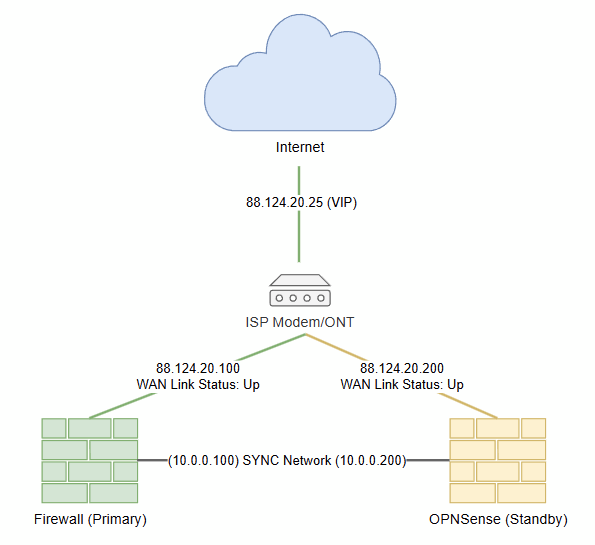
In the event of a failure of your primary firewall the VIP transfers to the standby firewall as part of promoting it to the primary:
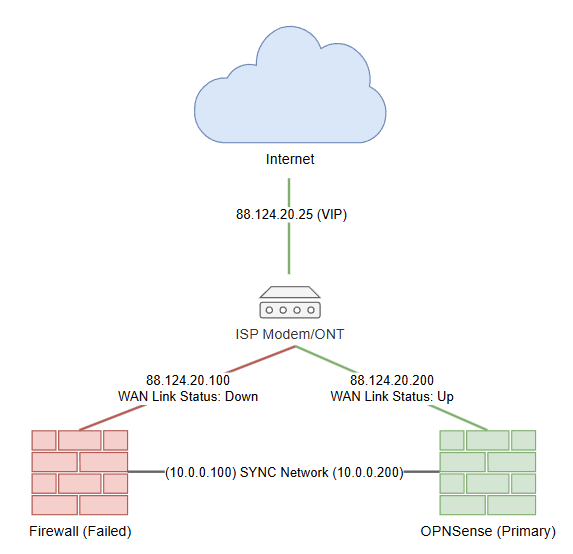
This works great when you have enough IPs to go around, only causes only a 1 packet outage and each firewall can have its WAN interface UP without causing conflicts.
Since most of us only get 1 dynamic IP from our ISP, we need to configure our two firewalls so the primary has its WAN interface UP with DHCP enabled and the standby with its WAN interface DOWN and DHCP enabled. You also need the WAN interface to have the same MAC addresses on both Firewalls so when you fail over from primary to standby and the standby performs a DHCP request when its WAN interface comes up, your ISP gives it the same IP the primary had.
If you don’t clone MACs, you’ll get a new IP from your ISP on fail over OR worse, nothing depending on how your ISP doles out IPs. I once had an ISP that required a power cycle of the modem before you could DHCP with a new MAC Address. Not ideal in a fail over situation where you might not be home.
Below, the image on the left shows things operating normally and the image on the right shows things after a fail over.
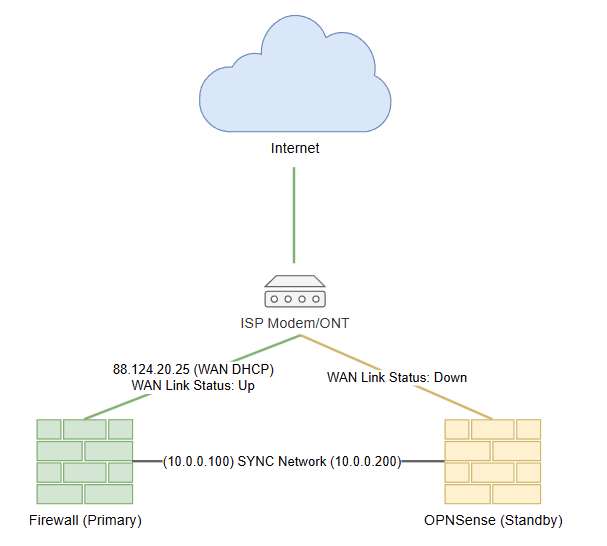
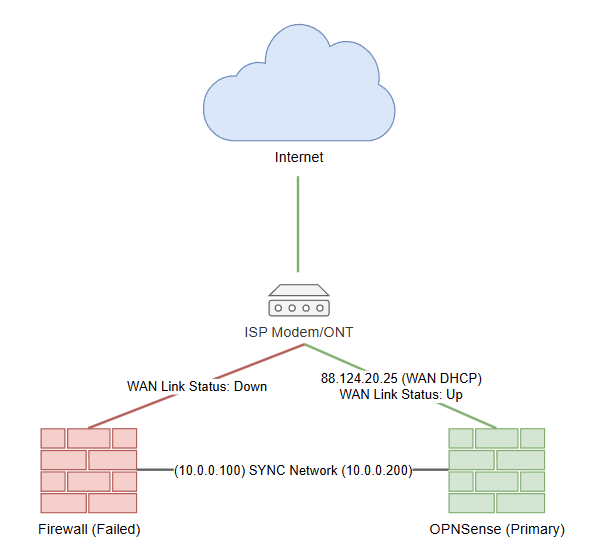
Unless your connection to your ISP uses PPoE, OPNSense cannot automatically keep the WAN down on your standby firewall until a fail over event occurs and then bring it up. This is what 10-wancarp solves.
The 10-wancarp fires whenever there is a fail over event and has one job, DOWN the WAN on the failed box (if still accessible) and UP the WAN on the new primary node. Since we don’t have a WAN VIP, this causes a few second delay while the new primary node UPs its WAN interface, does a DHCP request from the ISP and gets your IP back.
While setting this all up in my Homelab I ran into some problems with the 10-wancarp script I had downloaded from kronenpj’s gist. It turned out I ran into a few problems completely unrelated to that script but while going down the rabbit hole I had Claude Code review the script.
Claude found some issues/bugs with the script and I wasn’t a fan of the lack of instructions/documentation on how to get it working. Plus I noticed a bunch of comment out code that I wanted cleaned out. This is not me shitting on kronenpj’s work or anyone else involved in creating the script. Just my personal observations and a desire to make things easier for myself. I also wanted a –dryrun feature and more detailed logging to make troubleshooting easier. More details can be found in the “WHAT CHANGED VS. THE ORIGINAL (and why)” section of the script header.
Claude produced this version of 10-wancarp for me. I have tested it on the latest version of OPNSense (26.1.9) with out any issues. More details can be found in the README.